MiniMax H3 Image Generator and Editor
Create from a text prompt or edit with up to 16 reference images. MiniMax H3 Image is an open-weight AI model that follows detailed instructions for realistic photos, character art, posters, and diagrams. Choose 1K, 2K, or 4K output on Open Maker AI.
MiniMax H3 Image Examples and Prompt Ideas
See how different prompts and references shape a space-toy lineup, a labeled robot diagram, a science-fiction cast, and a surreal collage.
Combine Space-Toy References Into One Scene
The reference sheet becomes a lineup of robots, astronauts, and spacecraft on a miniature lunar set. Describe the shared backdrop and where each toy should go.
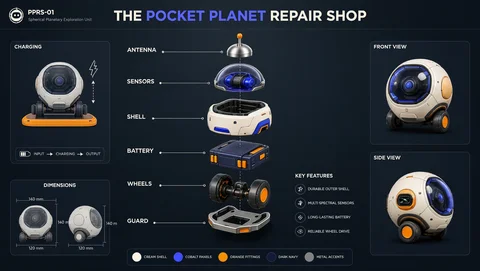
Create a Labeled Exploded-View Diagram
The Pocket Planet Repair Shop illustration shows a robot’s parts down the center, with front and side views alongside. Specify the components, exact labels, and panel positions in the prompt.
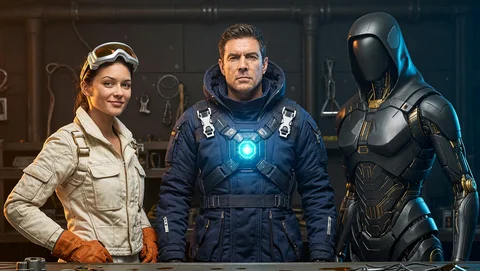
Design a Science-Fiction Cast
Goggles, a blue flight suit, and black armor distinguish three characters in the same workshop. Give each character a few defining details, then describe the light that ties the scene together.
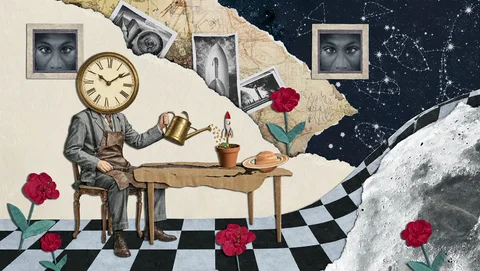
Build a Surreal Collage
A clock-headed figure tends a plant where a checkerboard room meets the night sky. Ask for torn paper, monochrome photos, and red flowers to define the collage’s layers and palette.
MiniMax H3 Image Generation and Editing Features
Use one model to create a new image, combine visual references, or revise a draft with written instructions.
Text-to-Image Generation
Describe the subject, camera angle, lighting, and style. Start from text alone to create a product scene, editorial illustration, or character concept.
Edit With Up to 16 Reference Images
Assign each upload a role. A sketch can guide the shape, a product photo can supply the materials, and a mood board can establish the color palette.
Make Targeted Edits With a Prompt
Ask for a new background, a different colorway, or softer lighting. Name the details you want to preserve, such as the subject’s pose or a product’s silhouette.
Choose 1K, 2K, or 4K Output
Pick from nine aspect ratios in the Open Maker AI form. Try 1K or 2K while comparing compositions and choose 4K when the final image needs finer detail.
Why Choose MiniMax H3 Image?
H3 Image pairs detailed instruction following with realistic materials and lighting. The same model handles the first draft and later edits.
Natural Lighting and Realistic Textures
Describe how light falls on fabric, paper, or polished metal. Material and lighting details help distinguish surfaces in product shots and illustrations.
Turn a Detailed Brief Into a Clear Layout
Describe panel order, labels, camera angle, or object placement. In a multi-view graphic, explain which details should stay consistent across the views.
Native High-Resolution Generation
MiniMax’s model card documents direct generation at around 16 megapixels in six sampling steps, including 4096 × 4096 for square images. The extra detail leaves more room to crop.
Open Weights for Local Deployment
MiniMax publishes its 33.1 billion-parameter diffusion transformer weights and inference code for compatible hardware. Deployment and redistribution are subject to its Community License.
What Can You Create With MiniMax H3 Image?
Try these workflows for product visuals, poster design, character art, and photo editing.
Product Mockups and Exploded-View Concepts
Use a product photo to guide the shape and finish. Try an alternate studio setting or mock up a labeled parts diagram, then verify details against the original.
Posters, Infographics, and Editorial Graphics
Specify the headline, labels, and reading order before generating an event poster or illustrated explainer. Check the text and facts before publishing.
Character Design and Concept Art
Turn a character brief into a costume or scene concept. Use a selected draft as a reference when trying a new pose, outfit, or setting.
Background Replacement and Photo Variations
Upload a photo and describe the new location, lighting, or palette. Call out the face, clothing, or product features you want to carry through the edit.
How to Use MiniMax H3 Image on Open Maker AI
Enter a prompt for a new image or add references for an edit. The form starts at 1K and 1:1, and the credit estimate updates with your selections.
Write a prompt and add reference images if needed
Select the aspect ratio and output resolution
Check the credit estimate, generate, and review the image
MiniMax H3 Image FAQ
See MiniMax’s official model card and Community License for the weights, local setup, and license terms.